
Bellvue Team and Jobs
Team (employees) and Jobs (work) being done as “dynamic data” – that is – we create database tables to describe “Bellvue Team” and “Bellvue Jobs”.
This makes is very easy to add new data (in particular: new jobs).
It also provides excellent consistency in the jobs.
So we can have a nice “grid” or “list” type layout on say the homepage that features work or the team.
These dynamic data entries are just like a custom WordPress Blog. They are created using the Crocoblock JetEngine plugin.
And those grid entries can be drilled in to, to get the detail on the particular job or team member.
This page then, is to test and develop those features.
At present, it’s split to cover two database driven ‘entities’…
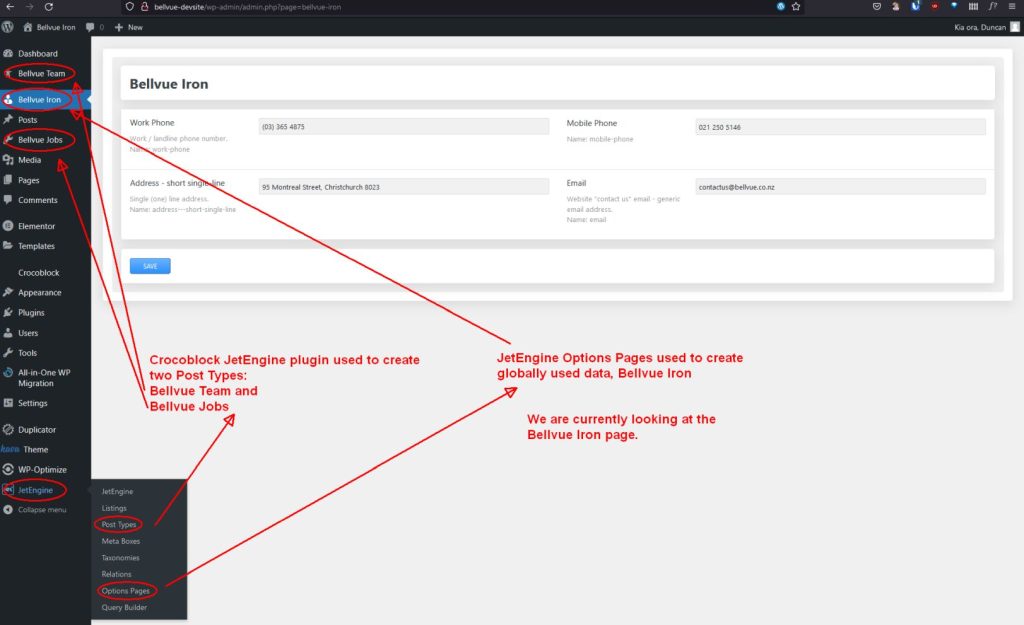
- “Bellvue Team” – the people that work at Bellvue (or close associates).
- “Bellvue Jobs” – the jobs, work, products and services – hopefully all can be represented in this single database table (but if necessary we can further split things up).
There is a third data entity, “Bellvue Iron”.
This is not an actual Custom Post Type (CPT), this is a special wee one-row database table that simply stores values that might be used throughout the website. (Described in full at bottom of this page).
Currently 29/5/2022) it’s storing: work phone, mobile phone, short single-line biz address and the website email address.
So by changing any of these values all instances used throughout the website are updated in one fell swoop.
Pic and description of these database entries in the website Dashboard...
Lorem ipsum dolor sit amet, consectetur adipiscing elit. Ut elit tellus, luctus nec ullamcorper mattis, pulvinar dapibus leo.
"Bellvue Team" first up...
"Bellvue Jobs" ...
29/5/2022 – under development. Duncan.
Job setup
So we’ve got some fields for “Bellvue Jobs” – are they enough to cover what we need to do?
Bellvue Jobs database fields:
Title
Listing description
Detailed description
Time to complete
Designer
Architect
Image Gallery
It also includes the built in: Featured Image field.
Along with this CPT, WordPress incorporates “Categories” – so I’ve taken advantage of this and created custom categories for Bellvue Jobs:
Featured, Job, Product, Service
So this means we can created listings based on any or a combination of those categories.
For example, we can have a listing grid on a page that show just Featured (ie. all Bellvue Jobs that have the Featured category set).
In other words: Featured Jobs! 🙂
By going through the Bellvue Jobs it is then easy to set or unset “Featured” on any Bellvue Job and therefore easily make changes to the “Featured Jobs” listing.
So it’s very easy to make the site change and show different jobs.
Job Listing (all)
Duncan's balustrade


15/06/2022: Job list / grid (as above) has got all fucked up.
Will sort out soon 🙂
Bellvue Options
Crocoblock supports a special options type.
(It’s like a one-row table.)
Data from Options tables can be used anywhere in the site where they might be displayed multiple times.
For example the work phone number.
So changing data in an Options table will change the data throughout the site (wherever that field is used).
Pics (therefore data fields) dated: 15/06/2022
We can add more fields if needed, no probs.
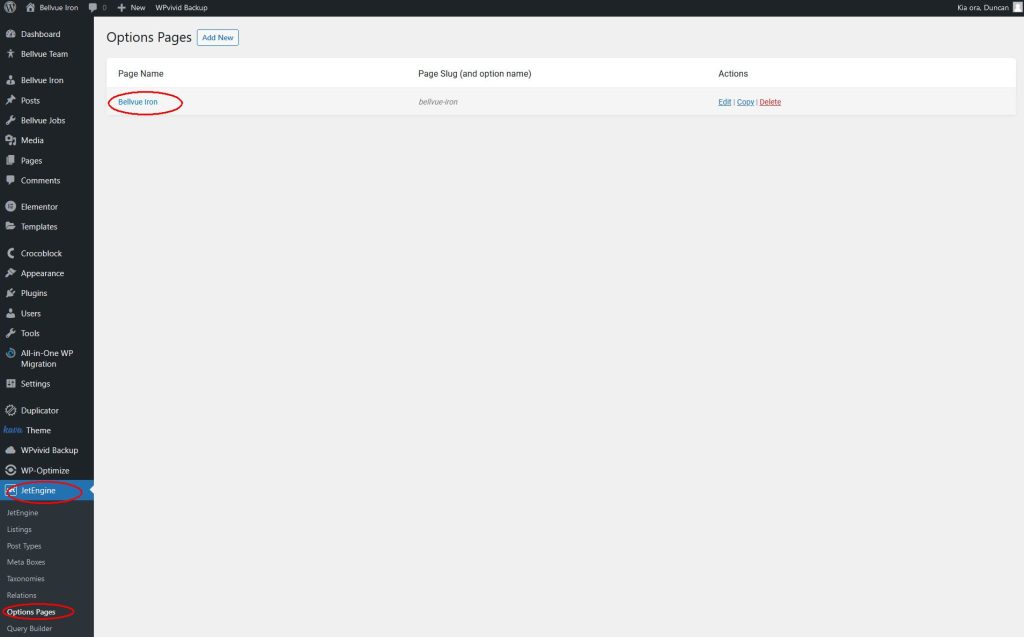
A single Options table exists for now, called “Bellvue Iron”…
And these are the populated fields (as shown… ‘Belvue Iron’ in the menu at left).
Change these values to change wherever they are used throughout the site in one fell swoop! 🙂
(That’s the idea!)
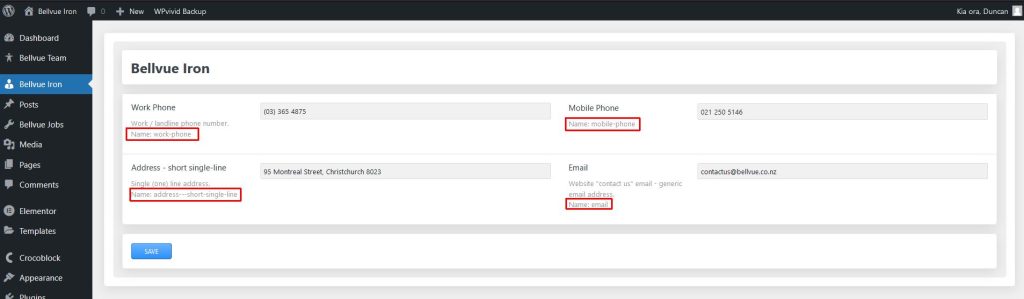
Here are those dynamic data Options fields...
The Options fields can be used on any Elementor widget that supports dynamic data. But the usual widgets one might use are:
Heading, Text, Icon list and even any of the Crocoblock dynamic data widgets (which have different options).
(03) 365 4875
This is an "Icon Box" Elementor widget
'Work Phone' dynamic field above (but this text could also be dynamic data too).
Even the icon at top can be dynamic.